Huawei Cloud CSMS + MySQL + phpMyAdmin
This example demonstrates using Docker Secret Operator (DSO) to inject MySQL credentials from Huawei Cloud Secret Management Service (CSMS) into a MySQL + phpMyAdmin stack — with zero secrets in your compose file or on disk.
Authentication uses IAM Agency on the ECS instance — no long-term access keys required.
What This Example Does
| Component | Role |
|---|---|
| Huawei CSMS | Stores MySQL credentials as a JSON secret |
| IAM Agency | Grants the ECS instance permission to read CSMS and KMS resources |
| dso-agent | Reads temporary credentials from ECS metadata, fetches secrets from CSMS |
| dso compose | Injects secret values into docker compose at container startup |
| mysql_db | MySQL container receives credentials via environment variables |
| phpmyadmin | Connects to MySQL without any credentials in the compose file |
Prerequisites
- DSO installed (
curl -fsSL .../install.sh | sudo bash) - A Huawei Cloud ECS instance in region
ap-southeast-2 - A CSMS secret created with your MySQL credentials (see Step 1)
- An IAM Agency with
CSMS FullAccessandKMS Administratorattached to the ECS (see Steps 2–4)
Step 1 — Create the Secret in Huawei CSMS
In the Huawei Console → Cloud Secret Management Service → Secrets, create a new secret.
- Secret type: Other
- Secret name:
localhost-sm(use your own name) - Secret value: JSON format with your MySQL credentials
{
  "MYSQL_ROOT_PASSWORD": "root",
  "MYSQL_USER": "admin",
  "MYSQL_USER_PASSWORD": "password"
}
Important: DSO maps the JSON field names to container ENV variables. The keys in
mappings:indso.yamlmust match the JSON field names exactly (case-sensitive).
Step 2 — Create an IAM Agency
Go to Huawei Console → IAM → Agencies → Create Agency.
In the Basic Information tab, fill in:
| Field | Value |
|---|---|
| Agency Name | prod-abstraxn-kong-csms (or any name you choose) |
| Agency Type | Cloud service |
| Cloud Service | Elastic Cloud Server (ECS) and Bare Metal Server |
| Validity Period | Unlimited |
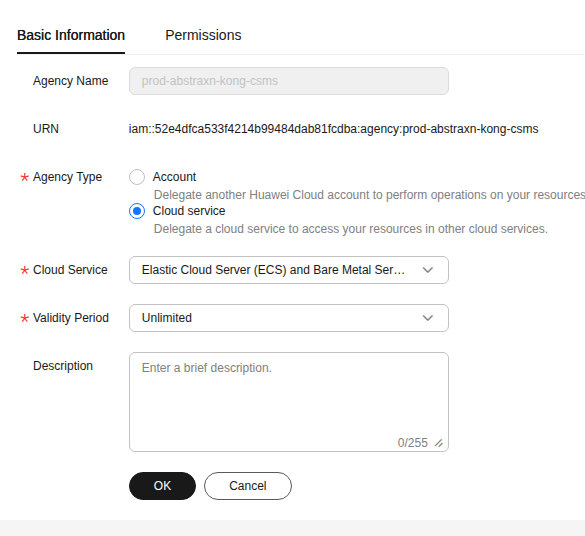
Click OK to create.
Step 3 — Add Permissions to the Agency
After creating the agency, go to the Permissions tab and click Authorize.
Add the following two policies:
| Policy | Scope | Why Required |
|---|---|---|
| CSMS FullAccess | All resources | Allows reading secret values from CSMS |
| KMS Administrator | All resources | Allows decrypting secret values encrypted by KMS |
Important: Without
KMS Administrator, you will get errorCSMS.0401— “Secret value decryption through KMS service failed.” Both policies are required.
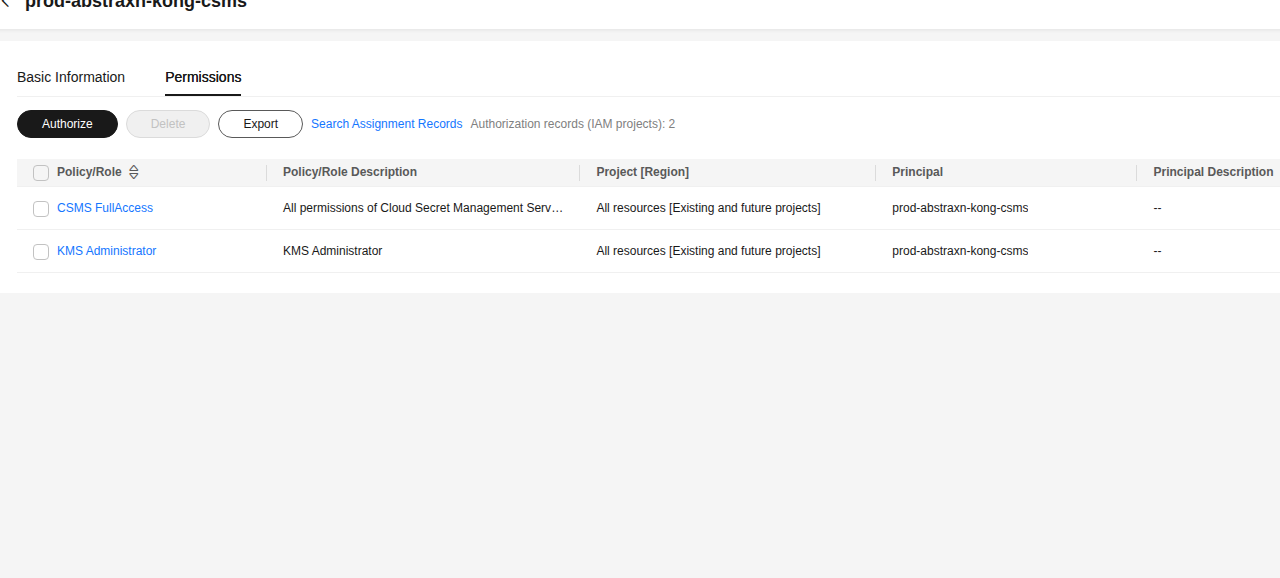
Step 4 — Attach the Agency to Your ECS Instance
Go to Huawei Console → ECS → Your Instance → Management Information.
Click the pencil icon next to Agency and select the agency you just created (prod-abstraxn-kong-csms).
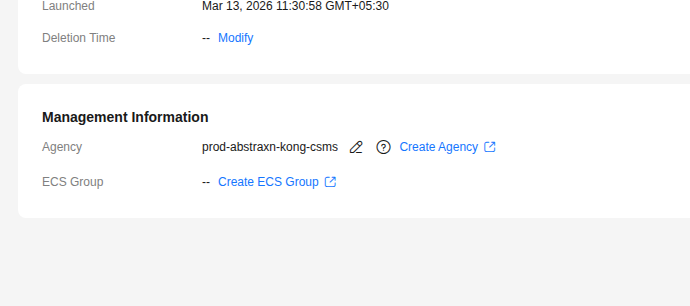
After attaching, the ECS instance can now obtain temporary credentials automatically from the metadata service without any long-term access keys.
Step 5 — Fetch Temporary Credentials and Configure DSO
On your Huawei ECS instance, run the following to fetch temporary credentials from the metadata service and write them to the DSO agent environment file:
# Fetch temporary credentials from ECS metadata service
CREDS=$(curl -s http://169.254.169.254/openstack/latest/securitykey)

sudo tee /etc/dso/agent.env > /dev/null << EOF
HUAWEI_ACCESS_KEY=$(echo $CREDS | python3 -c "import sys,json; print(json.load(sys.stdin)['credential']['access'])")
HUAWEI_SECRET_KEY=$(echo $CREDS | python3 -c "import sys,json; print(json.load(sys.stdin)['credential']['secret'])")
HUAWEI_SECURITY_TOKEN=$(echo $CREDS | python3 -c "import sys,json; print(json.load(sys.stdin)['credential']['securitytoken'])")
EOF

sudo chmod 600 /etc/dso/agent.env
Why this step is needed: The
dso-agentruns as a systemd service and does not inherit your shell environment. The credentials must be explicitly placed in/etc/dso/agent.envwhich the systemd unit reads asEnvironmentFile.
Step 6 — Configure DSO
Copy the provided dso.yaml to the system config location:
sudo mkdir -p /etc/dso
sudo cp dso.yaml /etc/dso/dso.yaml
sudo chmod 600 /etc/dso/dso.yaml
dso.yaml — connects to Huawei CSMS and maps the secret JSON fields to container ENV vars:
provider: huawei

config:
  region: ap-southeast-2
  project_id: 98176f42176505f83584d83fd6baedf   # Your project ID

agent:
  refresh_interval: 5s
  cache: true

secrets:
  - name: localhost-sm              # Exact CSMS secret name
    inject: env
    mappings:
      MYSQL_ROOT_PASSWORD: MYSQL_ROOT_PASSWORD   # JSON key → container ENV
      MYSQL_USER: MYSQL_USER
      MYSQL_USER_PASSWORD: MYSQL_PASSWORD        # JSON key → different ENV name
Finding your project_id: Huawei Console → top-right menu → My Credentials → Project ID for your region.
Step 7 — Start the DSO Agent
sudo systemctl restart dso-agent
sudo systemctl status dso-agent

# Verify the secret is reachable
dso fetch localhost-sm
Expected output:
Secret: localhost-sm
  MYSQL_ROOT_PASSWORD: root
  MYSQL_USER: admin
  MYSQL_USER_PASSWORD: password
Step 8 — Review the Docker Compose File
docker-compose.yaml — no secrets anywhere in this file:
services:
  mysql_db:
    container_name: mysql_database_cnt
    image: mysql:latest
    ports:
      - "3306:3306"
    environment:
      - MYSQL_ROOT_PASSWORD   # ← Injected from Huawei CSMS by DSO
      - MYSQL_USER            # ← Injected from Huawei CSMS by DSO
      - MYSQL_PASSWORD        # ← Injected from Huawei CSMS by DSO
    restart: always
    volumes:
      - $PWD/mysql-data:/var/lib/mysql

  phpmyadmin:
    container_name: phpmyadmin_cnt
    image: phpmyadmin/phpmyadmin:latest
    restart: always
    ports:
      - "82:80"
    environment:
      PMA_HOST: mysql_db
      PMA_PORT: 3306
Step 9 — Deploy
dso compose up -d
DSO will:
- Load
/etc/dso/dso.yaml - Use
HUAWEI_ACCESS_KEY,HUAWEI_SECRET_KEY,HUAWEI_SECURITY_TOKENfrom/etc/dso/agent.env - Fetch
localhost-smfrom Huawei CSMS inap-southeast-2 - Map
MYSQL_ROOT_PASSWORD,MYSQL_USER,MYSQL_USER_PASSWORDto the container ENV vars - Run
docker compose up -dwith the injected environment
Step 10 — Verify the Secrets Were Injected
docker exec -it mysql_database_cnt bash
env | grep MYSQL_
Expected output:
MYSQL_ROOT_PASSWORD=root
MYSQL_USER=admin
MYSQL_PASSWORD=password
Step 11 — Access phpMyAdmin
Open your browser at http://<ECS-PUBLIC-IP>:82
Login with:
- Server:
mysql_db - Username: the value of
MYSQL_USERfrom CSMS - Password: the value of
MYSQL_USER_PASSWORDfrom CSMS
Troubleshooting
Error CSMS.0401 — KMS decryption failed
huawei csms GetSecret: error_code: CSMS.0401, error_message: 凭据值通过KMS服务加密解密失败
The IAM Agency is missing KMS Administrator permission. Go to IAM → Agencies → your agency → Permissions → Authorize and add KMS Administrator. Both CSMS FullAccess and KMS Administrator are required.
Error: no credentials / credential build failed
The /etc/dso/agent.env file is missing or the temporary credentials have expired. Re-run the metadata fetch command:
CREDS=$(curl -s http://169.254.169.254/openstack/latest/securitykey)
sudo tee /etc/dso/agent.env > /dev/null << EOF
HUAWEI_ACCESS_KEY=$(echo $CREDS | python3 -c "import sys,json; print(json.load(sys.stdin)['credential']['access'])")
HUAWEI_SECRET_KEY=$(echo $CREDS | python3 -c "import sys,json; print(json.load(sys.stdin)['credential']['secret'])")
HUAWEI_SECURITY_TOKEN=$(echo $CREDS | python3 -c "import sys,json; print(json.load(sys.stdin)['credential']['securitytoken'])")
EOF
sudo chmod 600 /etc/dso/agent.env
sudo systemctl restart dso-agent
Note: Temporary credentials from ECS IAM Agency expire periodically (typically every 24 hours). Consider setting up a cron job to refresh them automatically.
Secret key not found in mappings
The JSON key in your CSMS secret must exactly match the key in mappings: (case-sensitive). Verify the secret structure:
# Using Huawei CLI (hcloud)
hcloud csms ShowSecretVersion \
  --secret-name localhost-sm \
  --version-id latest \
  --region ap-southeast-2
Automatic Credential Refresh (Optional)
Temporary IAM Agency credentials expire. Set up a cron job to refresh them daily:
sudo tee /etc/cron.d/dso-hw-creds > /dev/null << 'EOF'
# Refresh Huawei ECS IAM Agency credentials daily and restart agent
0 3 * * * root CREDS=$(curl -s http://169.254.169.254/openstack/latest/securitykey) && \
  AK=$(echo $CREDS | python3 -c "import sys,json; print(json.load(sys.stdin)['credential']['access'])") && \
  SK=$(echo $CREDS | python3 -c "import sys,json; print(json.load(sys.stdin)['credential']['secret'])") && \
  ST=$(echo $CREDS | python3 -c "import sys,json; print(json.load(sys.stdin)['credential']['securitytoken'])") && \
  printf "HUAWEI_ACCESS_KEY=%s\nHUAWEI_SECRET_KEY=%s\nHUAWEI_SECURITY_TOKEN=%s\n" "$AK" "$SK" "$ST" \
    > /etc/dso/agent.env && chmod 600 /etc/dso/agent.env && \
  systemctl restart dso-agent
EOF
File Structure
examples/huawei-compose/
├── docker-compose.yaml     # MySQL + phpMyAdmin (no hardcoded secrets)
├── dso.yaml                # DSO config pointing to Huawei CSMS
├── screenshots/
│   ├── iam-agency-basic-info.png     # Agency type = Cloud Service (ECS)
│   ├── iam-agency-permissions.png   # CSMS FullAccess + KMS Administrator
│   └── ecs-agency-attached.png      # ECS Management Info showing agency
└── README.md               # This guide
Cleanup
dso compose down
# Remove volumes too:
docker compose down -v